Forget Raspberry Pi Wifi Wireless Network
Access the command line
Access the Raspberry Pi terminal using SSH or by connecting a keyboard, mouse, and monitor to your Pi.
How to Connect to a Raspberry Pi Remotely via SSH
The preferred (and most common) method of connecting to your Pi to run commands.
Modify the existing wpa_supplicant config
Use the following command to access the full list of configured wireless networks:
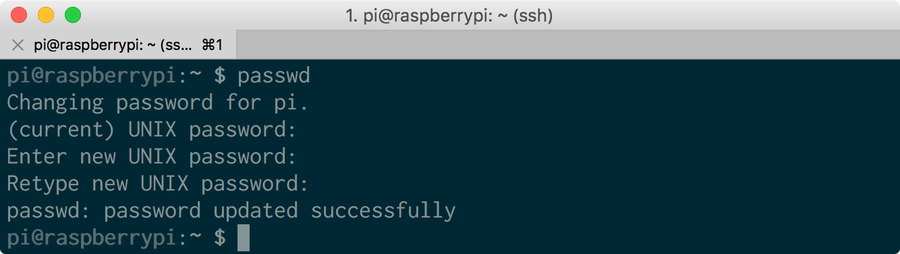
/etc/wpa_supplicant/wpa_supplicant.confYou’ll be prompted to enter your Raspberry Pi password—the default Raspberry Pi password is raspberrypi. If you haven’t already, I highly recommend you change your Raspberry Pi’s password after logging in by running the following command:
How to Change the Raspberry Pi Password
Raspberry Pi Default Username and Password
passwdDelete a wireless network
To forget a specific Pi wireless network, delete the corresponding network block, surrounded by opening and closing {} curly braces. For example, deleting the following will “forget” the serenity network:
network={
    ssid="serenity"
    psk="shepherdBookHasScaryHair$1"
    key_mgmt=WPA-PSK
}
If you want to forget a network but keep the configuration in place for later, you can uncomment the block instead by adding a # symbol to the beginning of each line. For example, uncommenting the following will “forget” the serenity network while keeping the details in the file for future use:
#network={
#    ssid="serenity"
#    psk="shepherdBookHasScaryHair$1"
#    key_mgmt=WPA-PSK
#}
When you’re done, save and exit by pressing CTRL-X, typing Y, and pressing enter.
A recommendation before deleting
Of course, if you’re connected to your Pi via the network you want to remove, you’ll be disconnected from the Pi as soon as your Pi forgets the network.
Therefore, I recommend adding a new network before deleting the other network—this makes it slightly easier to add your “new” network. If you need to, finding which network your Pi is connected to is easy.
How to Find the Current Raspberry Pi Wi-Fi Network Name (SSID)
Finding your Pi’s current network name is easy.
Connect to a new network
Connecting to a new network is as simple as generating a new wpa_supplicant.conf file or by running the raspi-config utility.
How to Set up Your Raspberry Pi Without a Keyboard, Monitor, or Mouse